How to Get the Best Results from AI (Claude): A Practical Workflow Guide.
1. Stop Searching for Magic Prompts
A magic prompt will not fix missing information.
If the AI gives you a weak, generic, or incorrect answer, the first question should not be:
“Did I use the right prompt?”
The better question is:
“Did I give the AI enough context to understand the task properly?”
What To Do
When asking AI for help, always include:
- A clear request Tell the AI exactly what you want it to do.
- Background information Explain the situation, goal, audience, problem, or project.
- A sample of good output Show what a strong answer should look like.
- The full source material Do not provide tiny fragments unless the task is very simple.
- The full error message or full issue For technical tasks, paste the full error, not just part of it.
Poor Example
"Fix the Code"
Better Example
“I am building a Laravel-based employee attendance system. This function should calculate total work hours after punch-in, punch-out, meal-in, and meal-out. Here is the full function, the error message, and an example of the expected output. Please identify the issue, explain it clearly, and provide a corrected version.”
Key Lesson
AI cannot guess what you did not provide. The more complete the context, the better the output.
2. Create a Clear AI Instruction File
Many people use AI every day but never give it consistent operating instructions.
As a result, every conversation starts from zero.
A standing instruction file solves this problem. In coding tools, this may be called CLAUDE.md. In browser-based AI tools, this can be a pinned brief, project note, or reusable instruction document.
What This File Should Include
Your instruction file should clearly explain:
- Who you are Your role, company, work style, and decision-making position.
- What the project is A short explanation of the project, product, or business.
- What the AI should not touch Areas that should not be changed without permission.
- Naming and formatting rules File naming, writing style, structure, language preference, or documentation format.
- How responses should be delivered For example: executive summary first, then details, then action steps.
Example Structure
# AI Working Instructions
User Identity
I am the founder and CEO of a technology startup. I use AI for strategy, product planning, writing, marketing, software development, and business operations.
Project Context
This project is focused on building scalable digital products, internal systems, and customer-facing technology solutions.
Do Not Touch Without Permission:
- Do not rename core files.
- Do not change business logic without explaining the impact.
- Do not remove existing content unless asked.
- Do not assume missing requirements.
Preferred Response Format:
- Start with a brief summary.
- Provide clear steps.
- Use tables when helpful.
- Give practical examples.
- End with recommended next actions.
Key Lesson
If your standing instructions are unclear, outdated, or copied from someone else, the AI will not work according to your needs.

If you use AI for serious work, you need a simple knowledge system.
Do not keep everything inside random chat history.
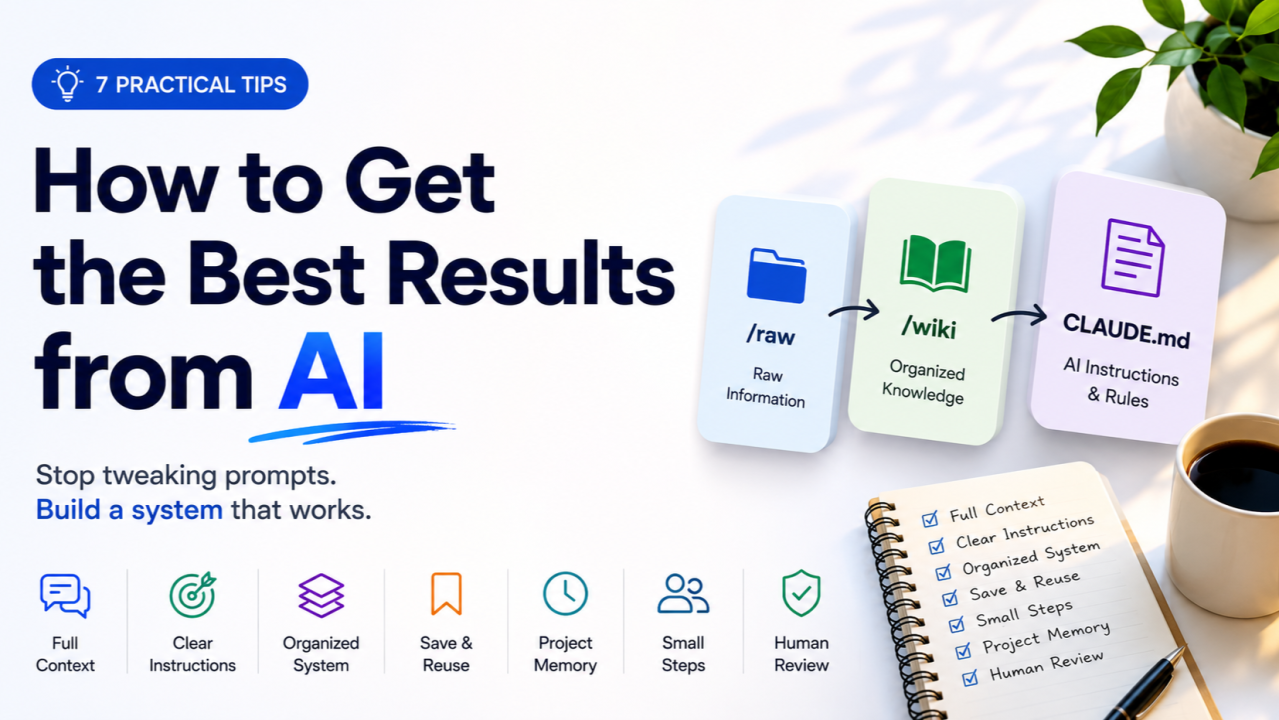
A practical system has three layers:
/raw
/wiki
CLAUDE.md or AI Instructions
Layer 1: /raw
This folder contains original materials exactly as they are.
Examples:
- Meeting notes
- Customer interviews
- Business ideas
- Error logs
- Research notes
- Draft documents
- Screenshots
- Feature requests
- Emails
- Product requirements
Do not over-organize this folder. Just store source material safely.
Layer 2: /wiki
This folder contains cleaned, structured, reusable knowledge.
Examples:
- Product overview
- Customer personas
- Feature list
- Brand messaging
- Technical decisions
- Marketing strategy
- SOPs
- FAQs
- Competitor research
The AI can help convert messy raw notes into structured wiki pages.
Layer 3: CLAUDE.md or AI Instruction File
This is the operating manual for how the AI should work with you.
It tells the AI:
- Who you are
- What the project is
- What rules to follow
- How to format responses
- What not to change
Simple Workflow
New information comes in
↓
Save it in /raw
↓
Ask AI to summarize and organize it
↓
Save the structured version in /wiki
↓
Update instruction file if needed
Key Lesson
If your project lasts more than a few days, you need memory outside the chat window.
4. Save Strong AI Responses Permanently
Most people waste good AI output.
They get a strong answer, copy part of it, close the tab, and later ask the same question again.
This creates repeated work.
Whenever AI gives you a valuable answer, save it permanently.
What to Save
Save outputs such as:
- A strong business strategy
- A useful prompt
- A technical explanation
- A product requirement
- A brand message
- A customer persona
- A reusable email
- A coding pattern
- A decision summary
- A process or SOP
How to Save It
Use a simple instruction:
Save this as a permanent wiki page under /wiki/[topic-name].md.
Clean it up, add headings, and make it reusable.
Example
Save this as /wiki/customer-onboarding-process.md.
Make it clear, structured, and easy for a team member to follow.
Periodic Cleanup
Every few weeks, review your saved wiki pages and check for:
- Duplicate notes
- Conflicting instructions
- Outdated information
- Missing details
- Poorly named files
Key Lesson
The best AI outputs should become reusable assets, not forgotten chat history.

5. Use index.md and log.md for Any Serious Project
If a project lasts more than one week, create two files immediately:
These two files help you remember what exists and what changed.
index.md: The Project Map
The index.md file is the map of the project.
It should list:
- Important files
- Wiki pages
- Product sections
- Decisions
- Research areas
- Current priorities
- Key references
Example
# Project Index
## Product Strategy
- /wiki/product-overview.md
- /wiki/target-users.md
- /wiki/pricing-strategy.md
## Technical Planning
- /wiki/system-architecture.md
- /wiki/database-structure.md
- /wiki/api-plan.md
## Marketing
- /wiki/brand-message.md
- /wiki/landing-page-copy.md
- /wiki/campaign-ideas.md
## Operations
- /wiki/team-workflow.md
- /wiki/weekly-meeting-process.md
log.md: The Change History
The log.md file records what changed and when.
Use a simple format:
Date | Type | Description
Example
# Project Log
| Date | Type | Description |
|---|---|---|
| 28-05-2026 | Summary | Added customer interview breakdown |
| 29-05-2026 | Decision | Selected MVP feature set |
| 30-05-2026 | Update | Revised landing page messaging |
| 01-06-2026 | Research | Added competitor analysis |
Why This Matters
After two weeks, you may not remember:
- Why a decision was made
- Which version is current
- What the AI already helped create
- Which ideas were rejected
- What needs to happen next
The index gives you structure. The log gives you memory.
Key Lesson
A project without an index and log becomes confusing very quickly.
6. Treat AI Like a Brilliant Intern
AI can be extremely useful, but it should not be treated like an independent expert with perfect judgment.
A better mindset is:
AI is a brilliant intern with massive knowledge, high speed, and weak judgment.
It can help you think, write, organize, research, code, and analyze. But it still needs supervision.
The Best Working Loop
Use this process:
1. Load full context
2. Ask for 2–3 options
3. Choose one direction
4. Ask for the next small step
5. Review the output
6. Test or verify it
7. Save or commit the result
8. Repeat
Poor Workflow
“Build the entire application.”
This usually creates messy, untested, and hard-to-debug output.
Better Workflow
“We are building the employee attendance module. Based on the current requirements, give me three possible database structures. Do not write code yet. Explain the pros and cons of each.”
Then:
“Use option 2. Now create only the table structure.”
Then:
“Now create the model relationships.”
Then:
“Now create the controller logic.”
Then:
“Now review the code for security and edge cases.”
Key Lesson
Do not ask AI to do everything at once. Use small steps, review carefully, and move forward gradually.
7. Ask for Research and Analysis in HTML Format
For research, analysis, comparison, or long-form explanations, one simple instruction can improve readability:
Structure your final response as a self-contained HTML file.
This helps because AI can organize information into:
- Sections
- Cards
- Tables
- Navigation
- Highlights
- Summaries
- Visual hierarchy
Example Prompt
Research the best onboarding workflow for a SaaS HR platform. Compare common patterns, user experience principles, activation strategies, and mistakes to avoid. Structure your final response as a self-contained HTML file.
When to Use This
Use HTML format for:
- Research reports
- Competitive analysis
- Strategy documents
- Product planning
- Training guides
- Investor summaries
- Market research
- Long technical explanations
Key Lesson:
Good formatting reduces reading time and makes complex information easier to understand.
The Complete AI Workflow
Here is the full system in one view:
1. Collect raw information
↓
2. Save it in /raw
↓
3. Give AI full context
↓
4. Ask for one clear task
↓
5. Request 2–3 options when needed
↓
6. Choose one direction
↓
7. Produce one small output
↓
8. Review and verify
↓
9. Save strong results in /wiki
↓
10. Update index.md and log.md
↓
11. Repeat
Practical Folder Structure:
Use this simple structure for any serious AI-assisted project:
/project-name
/raw
/wiki
Reusable AI Prompt Template
Use this template when starting a serious task:
I want you to help me with [specific task].
Context:
[Explain the background, project, audience, goal, and current situation.]
Source Material:
[Paste the full relevant material, notes, code, error message, or document.]
Expected Output:
[Describe what the final answer should look like.]
Example of Good Output:
[Provide a sample or describe the quality/style you want.]
Rules:
- Do not assume missing information.
- Ask only if something is truly blocking.
- Give practical, structured output.
- Keep the response aligned with the project context.
- If there are multiple possible directions, give 2–3 options first.
Now complete the task.
Example: Weak Prompt vs. Strong Prompt
Weak Prompt
Write a marketing plan for my product.
Strong Prompt
I am launching an AI-powered HR management platform for small and medium businesses. The product includes attendance tracking, leave management, payroll, recruitment, task management, and employee records.
Target users are business owners, HR managers, and operations teams.
I need a 90-day marketing plan focused on awareness, lead generation, demo booking, and early customer onboarding.
Please structure the response with:
1. Campaign goals
2. Target audience
3. Weekly action plan
4. Content ideas
5. Sales outreach strategy
6. Metrics to track
7. Recommended next steps
Make the tone practical, startup-friendly, and execution-focused.
The second prompt works better because it gives the AI context, audience, goal, structure, and expectations.
Common Mistakes to Avoid
Mistake 1: Giving Too Little Context
Bad output usually comes from missing background.
Mistake 2: Asking for Too Much at Once
Large vague tasks create messy responses.
Mistake 3: Not Saving Good Answers
If something is useful, turn it into a reusable document.
Mistake 4: Trusting AI Without Review
Always verify facts, numbers, technical details, and business logic.
Mistake 5: Restarting Every Session
Use files, notes, and project memory so you do not explain the same thing repeatedly.
Mistake 6: Letting AI Make Final Decisions Alone
AI can suggest options. You should make the judgment call.
Mistake 7: Having No Project Map
Without index.md, your knowledge base becomes difficult to navigate.
Simple Daily AI Workflow
Use this routine every day:
Start of Work
Load the relevant wiki page.
Tell AI what we are working on today.
During Work
Ask for small outputs.
Review each result.
Save useful answers.
Update the project files.
End of Work
Ask AI to summarize today’s progress.
Update log.md.
List next actions for tomorrow.
Save any important new decisions.
The people who get the best results from AI are not always the people with the best prompts.
They are the people with the best systems.
A strong AI workflow depends on:
- Full context
- Clear instructions
- Organized source material
- Saved knowledge
- Project memory
- Small-step execution
- Human review
Do not rely on one perfect prompt.
Build a simple system around the AI.
Start with:
/raw
/wiki
Then save every strong answer and keep improving the system.
That is how AI (Claude) becomes a long-term productivity partner instead of a frustrating chat window.